Table of Contents
What Are Pictograms, Symbols and Icons
Types of Pictograms and Their Application
Advantages of Pictograms in Manuals
Rules for Designing Pictograms
Development Process of Pictograms in 7 Steps
Intercultural Aspects and Context
Checklist for Developing Pictograms
Testing Pictograms: How Many Users Are Enough
Practical Application: Pictograms in Technical Documentation
What Are Pictograms, Symbols and Icons
Pictograms are simplified graphical representations that convey information without words. They are often mentioned alongside icons and symbols. However, there are subtle differences:
- Pictograms: Visual symbols that directly refer to an object, action or situation.
- Icons: Images that resemble the object they refer to, such as a bin for ‘delete’.
- Symbols: Abstract signs with an agreed meaning, such as an exclamation mark for ‘warning’.
According to Wikipedia, a pictogram is a visual symbol that communicates information through a simplified image. In manuals, we often distinguish three types:
| 1 |  | Iconic pictograms – These closely resemble the object they refer to, such as a finger in a safety pictogram warning of cutting hazards. |
| 2 |  | Symbolic pictograms – These are more abstract and require explanation, for example a triangle with an exclamation mark as a warning sign. |
| 3 |  | Hybrid forms – A combination of iconic and symbolic elements, such as a snowflake indicating cold. |
Why Are Pictograms Important
Universal Language
Pictograms are not tied to a specific language. People from different nationalities and cultures can understand them. This makes them highly suitable for products sold worldwide.
Efficient Communication
Pictograms immediately attract attention. Users recognise them quickly, they often stand out more than text, and they improve readability in technical documentation. Their shape, colour and use of white space ensure information is presented clearly.
Reduced Translation Costs
Because pictograms transcend language, they reduce the need for extensive translations. This saves both time and costs when developing manuals.
Safety and Ease of Use
Well-designed pictograms improve user safety. They warn of risks, provide instructions and offer guidance. In critical situations, a clear pictogram is often recognised faster than text.
Types of Pictograms and Their Application
Pictograms appear in various forms and contexts. In technical documentation, we distinguish:
Safety Pictograms
These focus on preventing accidents and ensuring health and safety, especially in the workplace. International standards include ISO 7010 and, in the United States, ANSI Z535.4.
Graphical Symbols and Safety Colours
Standardised symbols – often with fixed colours – quickly indicate a risk or required action. For example: red for danger, yellow for warning and green for safety.
General Applications in Manuals
Pictograms are widely used in daily life, such as traffic signs or functional indicators (toilets, charging icons, washing labels). In manuals, they are used for:
- marking safety instructions and warnings
- indicating hazards with machinery
- clarifying technical specifications in catalogues, brochures or datasheets
- displaying certifications and product features on websites
- supporting user instructions for vehicles or medical equipment
- indicating control options on interfaces or touchscreens
Advantages of Pictograms in Manuals
Using pictograms offers several advantages:
- Quick recognition: Users often understand pictograms faster than text.
- Compact presentation: They take up little space and convey information concisely.
- Motivating effect: They make manuals more visually appealing and less text-heavy.
- Language- and culture-independent: They help overcome language barriers.
Limitations of Pictograms
Pictograms are not always universal and have limitations:
- Differences in interpretation: Users from different cultures may interpret pictograms differently.
- Limited abstraction: Abstract or complex messages are difficult to express in a single image.
- Cultural influence: Prior knowledge and cultural context affect interpretation.
- Reading direction: Information processing order (left-to-right or right-to-left) influences design and placement.
Always use pictograms with care.
Rules for Designing Pictograms
Designing pictograms requires precision and knowledge of the target audience. If you design them yourself, follow these guidelines:
- Figure–Ground Contrast
Ensure the pictogram clearly stands out from the background. - Proximity and Similarity
Group related elements and maintain visual coherence. - Closed Contours
Use closed shapes or lines for clear recognition. - Simplicity and Clarity
Keep the pictogram as simple as possible without losing essential details. - Consistency in Sets
Ensure consistent style, size, colour and shape within a series. - Use of Colour
Use colour sparingly and functionally, especially for safety information. Avoid gradients and shadows. - Testing and Evaluation
Test pictograms with the intended audience, preferably internationally.
Development Process of Pictograms in 7 Steps
Follow these steps when designing pictograms:
Step 1 – Define the Message
Describe the goal and message in a few keywords or sentences. Also consider the context in which the pictogram is used.
Step 2 – Define the Target Audience
Identify user characteristics such as knowledge, experience and cultural background. The more specifically you define it, the more effectively the pictogram will match.
Step 3 – Recognise Limitations of Visual Language
Some messages are difficult or not fully possible to convey visually. In such cases, use supporting text. Always explain symbolic pictograms in the manual.
Step 4 – Design and Sketch
Start with sketches on paper. Work from concept to detail: first the content, then the form.
Step 5 – Simplify and Generalise
Choose the most recognisable image with minimal detail. Involve test users from the target audience to assess which design works best.
Step 6 – Finalise the Design
Have the design refined by a graphic designer with technical communication expertise. This ensures a professional final result that can be used across different formats and applications.
Step 7 – Test and Revise
Test with users and refine until the pictogram is clear to everyone. Small user tests are often sufficient to assess usability.
This ensures that your message is conveyed in a correct and efficient way.
Intercultural Aspects and Context
We already mentioned: Understanding your audience is essential. When developing pictograms consider:
- Visual conventions: What images are familiar within the culture?
- Context of use: Where and how will the pictogram be used?
- Cultural differences: Colours and symbols may have different meanings.
Pictograms and Use of Colour
You can use colour or black and white. Colour can enhance effectiveness but requires care:
- Limit colour use: Too much colour distracts from the message.
- Apply consistent colour coding: Use consistent colours for the same messages, for example red for ‘danger’.
- Consider cultural differences: Colours do not have the same meaning everywhere.
Checklist for Developing Pictograms
Good preparation prevents many problems. Ask yourself:
- Have you considered users’ prior knowledge and cultural context?
- Have you applied visual recognition principles (figure-ground contrast, closed contours)?
- Are the pictograms simple and complete?
- Are they consistent within a set?
And last but not least: Are symbolic pictograms clearly explained in the manual? This is mandatory.
Testing Pictograms: How Many Users Are Enough
Testing is essential. With limited testing, you can quickly achieve reliable results. According to usability expert Jakob Nielsen, testing with five users is often sufficient. Research shows that five users identify over 80% of usability issues. Additional users provide fewer new insights.
Practical Application: Pictograms in Technical Documentation
In manuals, pictograms serve multiple purposes:
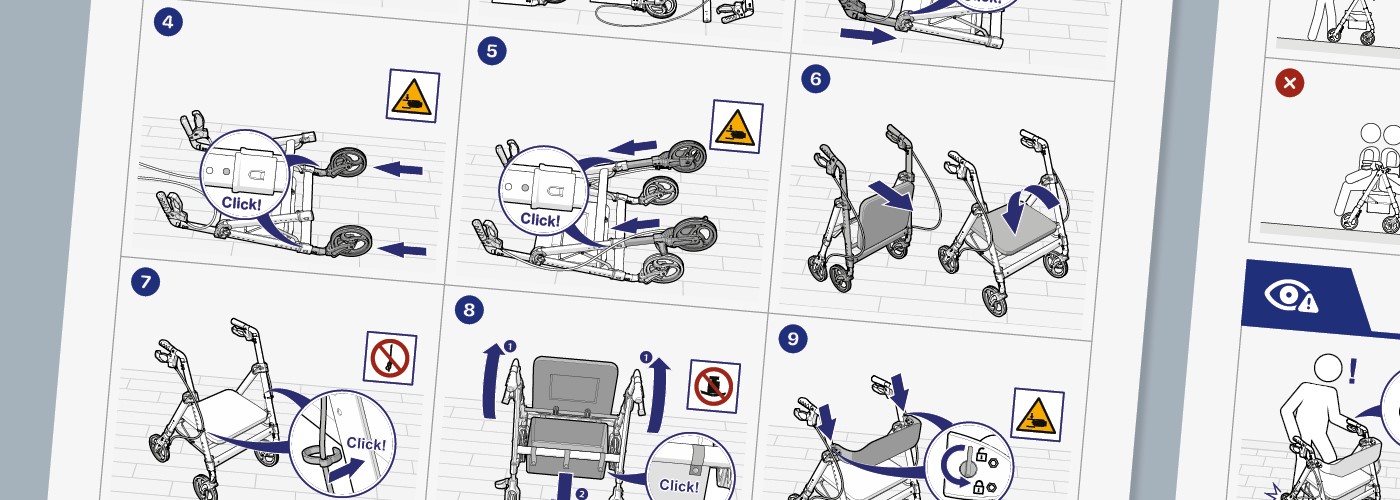
- Warning: e.g. for electrical hazards or moving parts
- Informing: about installation, maintenance or use
- Navigation: helping users find information quickly
- Guidance: supporting step-by-step processes
Pictograms can partly replace text, but usually not completely. Combine text and visuals for maximum clarity.
Help From an Expert
Pictograms are essential for clear, safe and international communication in manuals. They improve efficiency, reduce translation costs and enhance usability. Well-designed pictograms are simple, recognisable and tailored to the target audience.
With clear pictograms, you lay the foundation for understandable, practical and accessible technical documentation worldwide.
Manualise is happy to support you in designing and implementing effective pictograms in your manuals.