Table of Contents
What Is a Pictogram
A pictogram is a stylised visual representation that conveys a specific message without extensive text. Its strength lies in immediacy: the meaning is clear at a glance. Pictograms are therefore universal and independent of language or reading ability.
Practical Example: Road Signs
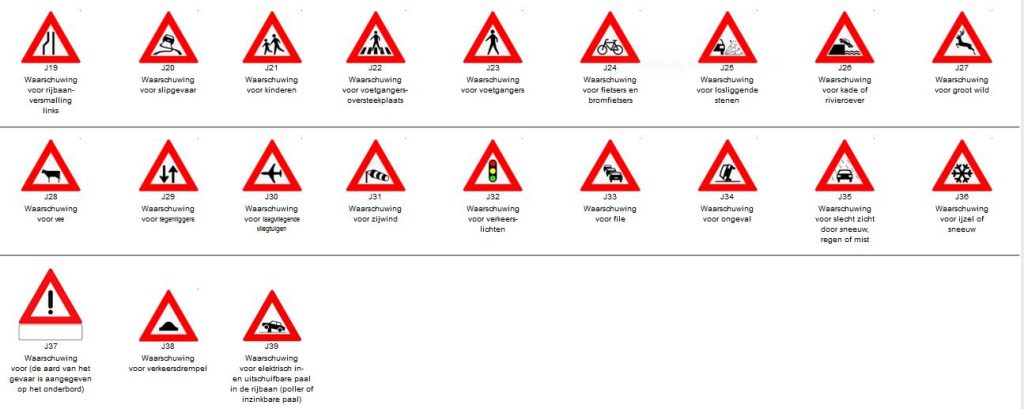
Road signs are well-known examples of pictograms. A triangular warning sign with a deer indicates possible crossing wildlife. The same sign with an aeroplane warns of low-flying aircraft. Even a circular sign with only a red border (‘No entry’) functions as a pictogram.
A pictogram does not always need to be a drawing. Shapes and colours alone can communicate a clear message.
Pictograms With or Without Text
Sometimes additional explanation is needed. A triangular sign with only an exclamation mark means ‘Warning’. Adding text such as ‘Warning: cyclists on the road’ makes the message more specific. In manuals, pictograms are often combined with short explanatory text. This prevents misunderstandings and improves safety.
Why a Pictogram Is Used
What is a pictogram without a clear meaning? Its main advantage is speed and simplicity. Instead of a long sentence (‘This parking space is reserved for people with disabilities’), a clear wheelchair symbol is sufficient.
People process visual information faster than text. As a result, pictograms increase efficiency and reduce the risk of misinterpretation.
Pictograms Are Context-Dependent
The meaning of a pictogram is partly determined by its context. A wheelchair symbol in a parking space means ‘parking for people with disabilities’. On a train door, it indicates accessibility.
Other pictograms also change meaning depending on context. A rising aeroplane at an airport indicates departures, while in a travel magazine it may refer to departure times. Users usually interpret these differences automatically.
Universal Language
Pictograms form an international language. People from different countries and cultures can understand them. This makes them essential in international manuals and technical documentation. Well-chosen pictograms prevent misunderstandings, even when users do not understand the language.
Examples of Pictograms
Pictograms come in many forms. Common categories include:
- Prohibition Pictograms
An anchor with a red line: ‘No mooring’
A cigarette with a red line: ‘No smoking’
- Mandatory Pictograms
A blue sign with a helmet: ‘Wear a helmet’
A safety vest symbol: ‘High-visibility vest required’
- Informational Pictograms
Emergency exit (running figure and arrow)
Restaurant (knife and fork)
New Pictograms
What is a pictogram for today’s world? As society evolves, so does the need for new pictograms. For example, the assembly point symbol for evacuations is relatively new: four figures with arrows pointing to the centre. Digital applications also require new symbols, such as those for charging points or hybrid vehicles.

Immediate Recognition
An effective pictogram is simple, clear and instantly recognisable. For example, a yellow triangular sign with a falling figure warns train passengers of a tripping hazard when exiting.
Pictograms in Manuals
Pictograms are an integral part of modern manuals. They structure complex information and improve user safety. In manuals, pictograms mainly serve two functions:
- Explanation and Instruction
A manual can clarify the meaning of a pictogram. For example, a water treatment manual may show a pictogram of a shower head above an eye, accompanied by the text: ‘Use the eye wash in case of contact with corrosive substances’. - Warning and Safety
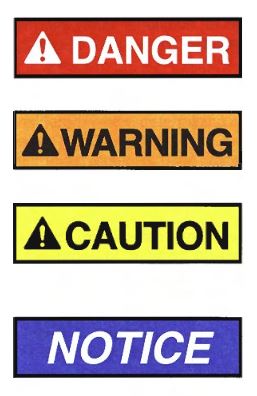
According to the internationally recognised ANSI Z535.6 standard, four warning categories are commonly used:- DANGER: risk of death if instructions are ignored
- WARNING: risk of serious injury or death
- CAUTION: risk of minor injury
- NOTICE: risk of material damage
These warnings usually include a triangle with an exclamation mark, often combined with a signal word. This allows users to quickly assess the level of risk.
Tips and Additional Information
Technical writers can highlight tips using symbols, such as a thumbs-up icon with the word ‘Tip’. This helps users quickly find useful guidance.
Designing Pictograms
Designing effective pictograms requires care and expertise. A well-designed pictogram:
- is simple and recognisable
- communicates a single, clear message
- fits within the visual identity
- is tested for clarity with end users
Consistent use of pictograms within a manual creates clarity and prevents confusion. It supports users in performing tasks safely and efficiently.
Get Started Yourself or Work With an Expert
Pictograms are essential for clear and safe user information. They ensure messages are understood quickly and correctly, regardless of language or background. By selecting pictograms carefully and applying them consistently, you improve efficiency, safety and usability.
Clear pictograms form the foundation of understandable and accessible manuals.
Manualise is happy to support you in developing effective pictograms and creating user-friendly documentation.